⏱ Estimated time: 5 minutes · Works with Apple Mail on macOS Ventura, Sonoma, and Sequoia
Before You Start
Apple Mail on Mac accepts rich HTML signatures when pasted from a rendered source — not raw HTML code. Create your signature in SigCraft on any browser, render it, then copy the visual output into Mail preferences.
Step 1: Create Your Signature with SigCraft
Go to the SigCraft signature builder and build your signature. Use AI input or the manual form, pick a template, set your brand color, and upload your avatar.
Step 2: Copy the Rendered Signature
- Click "Copy HTML" in the SigCraft builder.
- Open a new browser tab and paste (Cmd+V) to render the signature visually.
- Select the entire rendered signature (Cmd+A), then copy it (Cmd+C).
This step is essential — Apple Mail needs formatted content on the clipboard, not HTML source code.
Step 3: Open Apple Mail Preferences
- Open Apple Mail on your Mac.
- Go to Mail > Settings (or Preferences on older macOS).
- Click the Signatures tab.
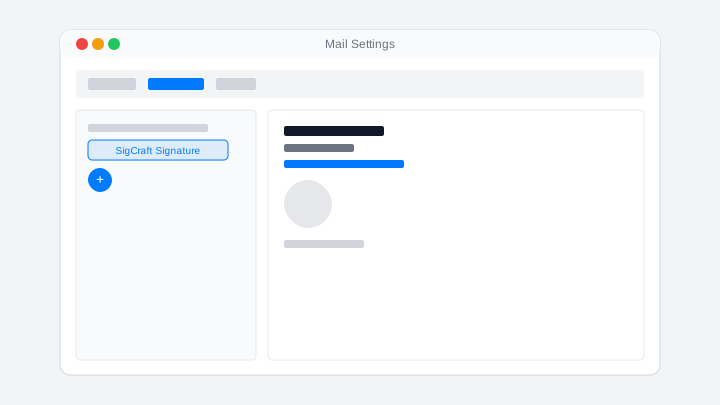
Step 4: Add and Paste Your Signature
- Select your email account in the left column.
- Click the + button to create a new signature.
- Name your signature (e.g., "SigCraft Signature").
- Click in the editor on the right and paste (Cmd+V) your rendered signature.
Step 5: Assign and Test
- Drag your new signature onto your email account in the left column to set it as default.
- Close Settings and compose a new email to verify the signature appears.
- Send a test email to yourself to check rendering on the receiving end.
Troubleshooting
Signature loses formatting after paste
Do not paste raw HTML into Apple Mail. Render the signature in a browser first, select the visual output, copy, then paste into the signature editor.
Signature not appearing on new emails
Drag your signature onto the correct account in the left column of the Signatures tab. An unassigned signature will not appear automatically.
Images show as broken links
Ensure you copied the fully rendered signature, not the HTML source. Broken images usually mean the clipboard contained markup instead of a rendered block.
Multiple signatures showing at once
Remove duplicate signature entries in Mail > Settings > Signatures. Keep one signature per account unless you intentionally switch between them.
Frequently Asked Questions
Why must I copy from a browser instead of pasting raw HTML?
Apple Mail's signature editor accepts rich text from the clipboard, not raw HTML source. Pasting into a browser first renders the HTML, so Apple Mail receives formatted content it can display.
Will my signature sync to iPhone and iPad?
If you use iCloud for Mail, signatures may sync across devices. However, many users set signatures per device. Check Settings > Mail > Signature on each device to confirm.
Can I have different signatures per email account?
Yes. In the Signatures tab, create multiple signatures and drag each one to the appropriate account in the left column.
Do images work in Apple Mail signatures?
Yes. SigCraft hosts avatar and social icons on Cloudflare R2 with absolute URLs. Recipients see images once they load remote content — same as any HTML signature.